Creating beautiful stat widgets in Filament
I love Filament and how easy it is to create beautiful admin panels with it. Out of the box Filament supports really beautiful stat overview widgets. My only pet peeve with these are that they take a lot of manual work to set them up, and that's why I created the spatie/filament-simple-stats package.
With just a few simple lines you can now build these widgets, without having to write any queries yourself.
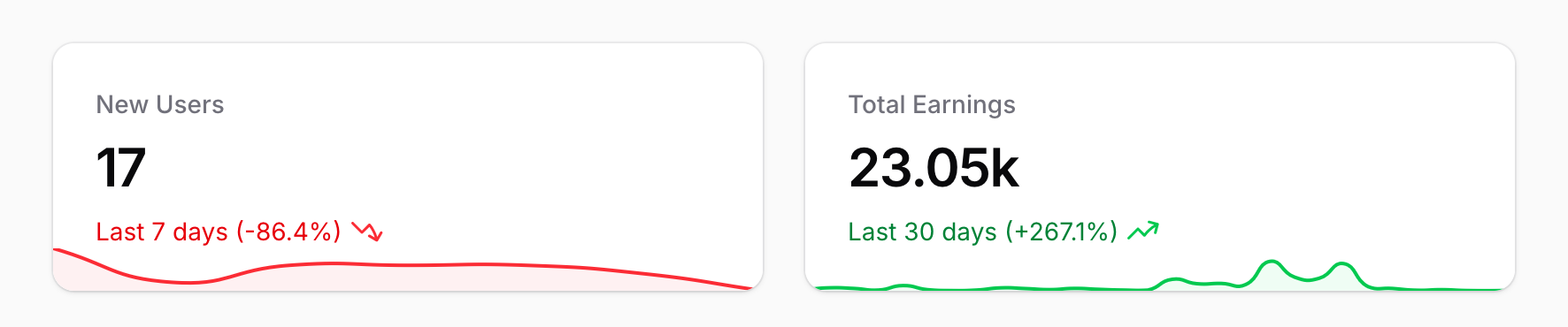
The code for these two examples is actually really simple. Let's start with the new users: We want to show how many new users have registered the last 7 days and we want the graph to show the evolution per day. To do this the code would look like this:
SimpleStat::make(User::class)
    ->last7Days()
    ->dailyCount()
Easy right?
The package can magically show this number because it knows that if you are using Laravel your models likely have a created_at property to use. The dailyCount() method tells the package to do a "count" of new models and to group them by day.
Now what if you need to use a property that Laravel doesn't know about? The "Total Earnings" can't simply count the new models, it needs to create a sum of the value of purchases. To do this instead of dailyCount() we need to call dailySum and pass the column on the Purchase model that has the earnings value for that purchase:
SimpleStat::make(Purchase::class)
    ->last30Days()
    ->dailySum('earnings')
There are a ton of these intuitive methods to allow you to quickly build some stat widgets, besides "daily" all methods also allow monthly and yearly grouping. Besides sum and count methods there are also "average" methods that can be quite useful.
Trends
The big new feature that motivated me to push the 1.0 version over the line is the "trend" feature. This feature is enabled on all widgets by default (but can be disabled by calling withoutTrend()) and will show increases/decreases period over period.
So for the users widget, where the last 7 days are displayed, the number will be compared to the 7 day period before that.
By default the line will be colored red for a decreasing number, or green for an increasing number.
Of course for some stats you want to do the opposite if lower is better, for example when displaying response times. To achieve this you can call the invertTrendColors() method.
Shoutouts
Two shoutouts I want to give, because they allowed me to build this package:
- Filament: there's no UI in this package, everything leverages the beautiful widgets that Filament had already created.
- Flowframe/laravel-trend: this is a great package that makes it easy to gather stats from your Laravel models.